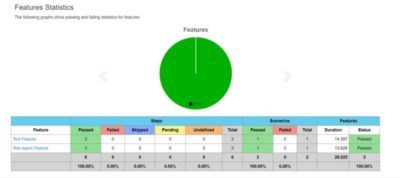
In this post we will show how to generate a pretty report after cucumber test execution.
Using technology:
- Maven
- Java 8
- Cucumber 1.2.5
- First of all you need to add following library in your pom.xml file:
<dependency>
    <groupId>net.masterthought</groupId>
    <artifactId>cucumber-reporting</artifactId>
    <version>3.19.0</version>
</dependency>
<dependency>
    <groupId>com.github.mkolisnyk</groupId>
    <artifactId>cucumber-report-generator</artifactId>
    <version>1.3.4</version>
</dependency>
After that you will need to do some changes in your Cucumber Runner to generate a json file after test execution.
@RunWith(Cucumber.class)
@ExtendedCucumberOptions(
        jsonReport = "target/cucumber.json"
        )
@CucumberOptions(features = {"src/main/tests/features"},
        plugin = {
        "json:target/cucumber.json",}
)
public class CucumberRunner {
}
In my case I’ve just added:
@ExtendedCucumberOptions(
jsonReport = "target/cucumber.json"
)
To save the execution cucumber report in “target/cucumber.json” and after that added plugin.
 plugin = {
"json:target/cucumber.json",}
Now is the moment to generate a pretty report how you see in the picture above, so for this we will create an java executable class there will be define the code to generate report in target repository.
public class ReportGenerator {
    public static void main(String[] args) throws IOException {
        File reportOutputDirectory = new File("target");
        List<String> jsonFiles = new ArrayList<>();
        jsonFiles.add("target/cucumber.json");


        String buildNumber = "1";
        String projectName = "cucumberProject";
        boolean runWithJenkins = false;

        Configuration configuration = new Configuration(reportOutputDirectory, projectName);
// optional configuration - check javadoc
        configuration.setRunWithJenkins(runWithJenkins);
        configuration.setBuildNumber(buildNumber);
// addidtional metadata presented on main page
        configuration.addClassifications("Platform", "Windows");
        configuration.addClassifications("Browser", "Chrome");
        configuration.addClassifications("Branch", "develop");
        ReportBuilder reportBuilder = new ReportBuilder(jsonFiles, configuration);
        reportBuilder.generateReports();
    }
}
This is all you need, hope this will help you!
In case of some questions don’t hesitate to add a comment!